,

G.729 and G.723 Codec installation on Asterisk

Installation and Configuration of G.729 and G.723 codecs on asterisk
  1. Download the codec binary file from http://asterisk.hosting.lv/bin/codec_g729-ast14-gcc4-glibc-pentium4.so
  2. Copy it to the /usr/lib/asterisk/modules folder.
  3. Restart the Asterisk: /etc/init.d/asterisk restart

Estimating the Number of G.729 Channels Required

If you choose to purchase the G.729 license from Digium you will need to compute the number of G.729 channels required by your configuration. You can estimate the required value by using the following information:
  • a call between two SIP extensions usually requires two G.729 channels, unless the pass-thru mode is used (http://voip-info.org/wiki/view/Asterisk+G.729+pass-thru), in which case it doesn’t require any G.729 channel.
  • a call between a SIP extension and a Zaptel/DAHDI extension/trunk requires one G.729 channel.
  • a call to Voice Mail or another Asterisk service where IVR messages must be played requires one G.729 channel.
Continue reading G.729 and G.723 Codec installation on Asterisk
,

SIP Trunking - IP Based authentication and Password based authentication

SIP trunking is the method of sending calls to ITSP service provider using sip protocol.

Indepth details refer RFC 3261

There are two types of authentications

1. IP based authentication
2.Username and Password based authentication


For IP Based Authentication
You need to do the following changes in the sip.conf


[siptrunk]
type=friend
fromuser=X.X.X.X ( your asterisk server ip ) which will send traffic to the service provider
host=X.X.X.X ( service provider ip )
canreinvite=no
qualify=no
dtmfmode=RFC2833
context=intenal
disallow=all
allow=g729
allow=ulaw
allow=alaw
port=5060


Then you need to edit extensions.conf[intenal]
exten => _9X.,1,Dial(SIP/${EXTEN}@siptrunk)


For Username and password based authentication

[siptrunk]
type=friend
username=
fromuser=X.X.X.X
host=X.X.X.X
canreinvite=no
secret=
qualify=no
dtmfmode=RFC2833
context=intenal
disallow=all
allow=g729
allow=ulaw
allow=alaw
port=5060

define username and password to it
Continue reading SIP Trunking - IP Based authentication and Password based authentication
,

Setup DKIM on Postfix with OpenDKIM

Introduction

DKIM is an authentication framework which stores public-keys in DNS and digitally signs emails on a domain basis. It was created as a result of merging Yahoo's domainkeys and Cisco's Identified Internet mail specification. It is defined in RFC 4871.

We will be using the OpenDKIM implementation Centos, OpenDKIM is a fork of dkim-milter.

Installation

yum install opendkim

Generate the Keys

opendkim-genkey -d  -s 
Replace with the domain name you will be signing the mail for, and with a selector name it can be anything (but just one word). The command will create two files.
  • .txt - contains the public key you publish via DNS
  • .private - the private key you use for signing your email
Create a sub directory in /etc/opendkim/keys to store your key, i prefer to use the domain name as the sub directory name.
# mv .private /etc/opendkim/keys//.pem
# chmod 600 /etc/opendkim/keys//.pem
# chown opendkim.opendkim /etc/opendkim/keys//.pem

DNS Setup

You need to publish your public key via DNS, client servers use this key to verify your signed email. The contents of .txt is the record you need to add to your zone file a sample, is below (it uses default as the selector and example.com as the domain_name)
default._domainkey IN TXT "v=DKIM1; r=postmaster; g=*; k=rsa;
p=MIGfMA0GCSqGSIb3DQEBAQUAA4GNA
DCBiQKBgQDG81CNNVOlWwfhENOZEnJKNlikTB3Dnb5kUC8/zvht/S8SQnx+YgZ/KG7KOus0By8cIDDv
wn3ElVRVQ6Jhz/HcvPU5DXCAC5owLBf/gX5tvAnjF1vSL8ZBetxquVHyJQpMFH3VW37m/mxPTGmDL+z
JVW+CKpUcI8BJD03iW2l1CwIDAQAB" ; ----- DKIM default for example.com

Configuration

Edit /etc/opendkim.conf comment out "KeyFile /etc/opendkim/keys/default.private" and uncomment "#KeyTable /etc/opendkim/KeyTable"

Edit the file /etc/opendkim/KeyTable and add your domain using the following format
._domainkey. ::/etc/opendkim/keys//.pem
Add your servers IP addresses to /etc/opendkim/TrustedHosts
More advanced configuration options can be set in the file /etc/opendkim.conf

Configure Postfix

You need to add the following options to the postfix main.cf file to enable it to use the milter.
smtpd_milters = inet:localhost:8891
non_smtpd_milters = inet:localhost:8891
Append the OpenDKIM options to the existing milters if you have other milters already configured.
Start OpenDKIM and restart postfix
# service opendkim start
# service postfix restart

Testing

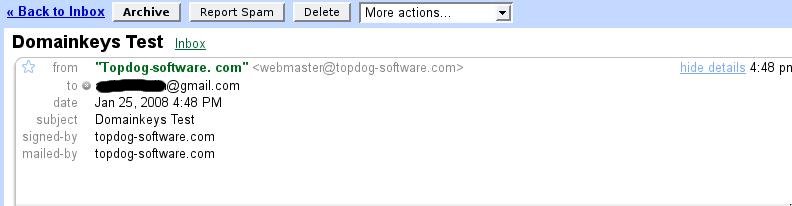
Send an email to sa-test@sendmail.net or autorespond+dkim@dk.elandsys.com, you will receive a response stating if your setup is working correctly. If you have a Gmail account you can send an email to that account and look at the message details similar to the picture below, you should see signed-by “your domain” if your setup was done correctly.

DKIM signed mail in google

Continue reading Setup DKIM on Postfix with OpenDKIM
, ,

PHP 5.3 on CentOS/RHEL 5.11 via Yum

To install, first you must install the yum repository information:

rpm -Uvh http://mirror.webtatic.com/yum/centos/5/latest.rpm
 
Now you can install php by doing:

yum --enablerepo=webtatic install php
 
Or update an existing installation of php, which will also update all of the other php modules installed:

yum --enablerepo=webtatic update php
Continue reading PHP 5.3 on CentOS/RHEL 5.11 via Yum
,

PHP5 with IMAP and SSL support

Building your own PHP with IMAP support is not that hard, but i noticed a lot of people tend to have problems when they want SSL support in it.
You might run into stuff like this (when reconfiguring php f.e.):
configure: error: utf8_mime2text() has new signature, but U8T_CANONICAL is missing. This should not happen. Check config.log for additional information.


This exact same problem came up for me on Fedora when trying to compile PHP 5.5.0.
The problem is related to the '--with-imap' configuration parameter.
In order to solve this problem I compiled my own version of imap from the latest source (currently imap-2007f) and to do that I had to install some prerequisites. On fedora I did this...

yum install openssl openssl-devel pam-devel
wget ftp://ftp.cac.washington.edu/imap/imap-2007f.tar.gz
tar zxvf imap-2007f.tar.gz
 
Then I had to make a soft link so the compiler could find the libraries. In my case I did the following:

mkdir /usr/local/ssl
ln -s /usr/include /usr/local/ssl/include
 
and then compile:

cd imap-2007f
make lnp SSLTYPE=unix EXTRACFLAGS=-fPIC
 
Then I was able to compile PHP by adding the imap source path to the config param like so:

/path/to/php/src> ./configure ...other_params...  
              '--with-imap=/path/to/imap-2007f' '--with-imap-ssl' 
make
make install
Continue reading PHP5 with IMAP and SSL support
,

Apache: service httpd does not support chkconfig

As you know, when you installed your Apache service to your Centos/Redhat server manually (make & make install but not yum) and could like to run the service automatically, you should copy the apachectl from the Apache bin folder to /etc/init.d/ folder as named httpd.
Then you might want to set the chkconfig and facing the error as below,

1
service httpd does not support chkconfig

To fix this issue, you may simply add the following line to your file at /etc/init.d/httpd.
 
 
1
2
3
4
5
6
7
8
9
#
# Startup script for the Apache Web Server
#
# chkconfig: - 85 15
# description: Apache is a World Wide Web server. It is used to serve
# HTML files and CGI.
# processname: httpd
# pidfile: /usr/local/apache/logs/httpd.pid
# config: /usr/local/apache/conf/httpd.conf

Then you may chkconfig again,

1
chkconfig --level 235 httpd on

And now restart your httpd service.
Continue reading Apache: service httpd does not support chkconfig
, ,

Issues with firewall on HW Node - Impossible to use ip_nat and ipt_state modules

Information

Symptoms vary and may include:
  • Some iptables rules are not working
  • You see the following error when trying to create an iptables rule in the NAT table or when trying to use the STATE module:
    # iptables -t nat -L
    iptables v1.3.5: can't initialize iptables table `nat': Table does not exist (do you need to insmod?) Perhaps iptables or your kernel needs to be upgraded.
    #
    

Cause

This problem usually occurs because connection tracking (the "conntracks" module) is disabled on your Parallels Virtuozzo Containers (PVC) hardware node (HW Node) by default. This means iptables is not statefull in the default installation.
You can verify this by checking whether you get the same output as below:
~# grep conntrac /etc/modprobe.d/vz-parallels.conf
options nf_conntrack ip_conntrack_disable_ve0=1
When support for connection tracking is disabled, the NAT table is absent in the list of available tables:
~# cat /proc/net/ip_tables_names
mangle
filter
Therefore, it is impossible to use the nf_nat and xt_state modules on the HW Node.

Resolution

Note: STATE module functionality of iptables may be replaced by adding explicit complimentary rules for INPUT and OUTPUT chains.
If you are not satisfied by that workaround or if you need the NAT table functionality, continue reading further.
Before you enable connection tracking support, we strongly recommend considering the following notes and warnings:
Warning 1: Enabling connection tracking uses a lot of resources.
Warning 2: With "conntracks" enabled, the HW Node may become completely unreachable from the network when you have a high network load. If a hosted container has malicious software running, a kernel panic can occur.
That is because the number of connection tracking slots is limited for a physical server. Enabling "conntracks" is especially dangerous for a PVC HW Node, because it allocates two tracking slots for each connection to a container – one for external connection and another one for connecting the HW Node with the container. So if a container opens too many connections, the HW Node will not be able to create any new connections.
This sort of situation might arise due to a DDoS attack of any container. The HW Node administrator would not be able to stop it by stopping a CT or adding iptables rules, because the administrator could not log in to the Node.

How to enable "conntracks":

  1. Check that all necessary modules are loaded on the Hardware Node:
    ~# lsmod | grep -E "state|nat"
    nf_nat_ftp              3489  0
    nf_conntrack_ftp       12927  1 nf_nat_ftp
    iptable_nat             6236  0
    nf_nat                 23178  3 vzrst,nf_nat_ftp,iptable_nat
    nf_conntrack_ipv4       9848  3 iptable_nat,nf_nat
    ip_tables              18021  3 iptable_nat,iptable_mangle,iptable_filter
    xt_state                1474  2
    nf_conntrack           80758  8 vzrst,nf_nat_ftp,nf_conntrack_ftp,iptable_nat,nf_nat,nf_conntrack_ipv4,nf_conntrack_ipv6,xt_state
    
  2. Add those modules to the iptables configuration on the Node:
    ~# egrep '^IPTABLES_MODULES' /etc/sysconfig/iptables-config
    IPTABLES_MODULES="ipt_REJECT ipt_tos ipt_limit ipt_multiport iptable_filter iptable_mangle ipt_TCPMSS ipt_tcpmss ipt_ttl ipt_length xt_length xt_hl xt_tcpmss xt_TCPMSS xt_multiport xt_limit xt_dscp nf_conntrack iptable_nat"
    IPTABLES_MODULES_UNLOAD="yes"
    
  3. Edit /etc/modprobe.d/vz-parallels.conf and set ip_conntrack_disable_ve0=0:
    ~# grep conntrac /etc/modprobe.d/vz-parallels.conf
    options nf_conntrack ip_conntrack_disable_ve0=0
    
  4. Enable iptables, logging to verify that it works:
    ~# egrep '^kern' /etc/rsyslog.conf
    kern.*                                                 /var/log/messages
    
  5. Restart iptables:
    ~]# service iptables restart
    iptables: Applying firewall rules:                         [  OK  ]
    iptables: Loading additional modules: ipt_REJECT ipt_tos ipt_limit ipt_multiport iptable_filter iptable_mangle ipt_TCPMSS ipt_tcpmss ipt_ttl ipt_length xt_length xt_hl xt_tcpmss xt_TCPMSS xt_multiport xt_limit xt_dscp ip_conntrack iptable_nat                                         [  OK  ]
    
    (Please note that unloading of kernel modules can fail if modules are in use by running containers.)
  6. Restart syslog:
    ~# service rsyslog restart
    Shutting down system logger:                               [  OK  ]
    Starting system logger:                                    [  OK  ]
    
  7. Add a test rule, e.g., one to track new SSH connections:
    ~# iptables -A INPUT -p tcp -m tcp --dport 22 -m state --state NEW -m recent --set --name ssh_attempt --rsource -j LOG --log-prefix "SSH connection attempt: "
    
  8. Avoid tracking any other TCP connections to save system resources:
    ~# iptables -t raw -I PREROUTING -p tcp !  --dport 22 -j NOTRACK
    
    Note: setting rules in the raw table might cause issues with CT #1 restart. Update PVA Agent to the latest version.
  9. Try to log in to the server via SSH while monitoring the log:
    Jan 11 02:29:19 pvclin47 kernel: [  106.459592] SSH connection attempt: IN=eth0 OUT= MAC=00:1c:42:ac:d1:c9:00:1e:67:07:55:95:08:00 SRC=192.168.55.3 DST=10.39.3.111 LEN=60 TOS=0x00 PREC=0x00 TTL=63 ID=44446 DF PROTO=TCP SPT=51889 DPT=22 WINDOW=5840 RES=0x00 SYN URGP=0
    Jan 11 02:29:19 pvclin47 kernel: [  106.459592] SSH connection attempt: IN=eth0 OUT= MAC=00:1c:42:ac:d1:c9:00:1e:67:07:55:95:08:00 SRC=192.168.55.3 DST=10.39.3.111 LEN=60 TOS=0x00 PREC=0x00 TTL=63 ID=44446 DF PROTO=TCP SPT=51889 DPT=22 WINDOW=5840 RES=0x00 SYN URGP=0
    

FAQ

Q: What exactly does this option do?
A: This option controls the tracking of packets in the Node's environment. When it is disabled, packets are accepted, routed, etc., but the kernel does not store any information about the packet's connections, as it considers each packet to be a complete unit.
This option also has implications for NAT. For NAT, you need to have the following information: you need to determine the first packet of a connection and decide which of the next packets belongs to this first packet, i.e., which packet should be considered as a "connection."

Additional information
Continue reading Issues with firewall on HW Node - Impossible to use ip_nat and ipt_state modules
,

How to Change default MySQL Data Directory in Linux

As a System Administrator I don’t prefer to use / directory to store MySQL data files. Each time when I install MySQL for a production server, I tried to use secondary disk for storing application and database file. In that way I always change the default data directory of MySQL to secondary disk mounted on system.
Mostly MySQL uses /var/lib/mysql directory as default data directory for Linux based systems. Which are going to change to another location in this article.


Instruction’s to Change Default MySQL Data Directory:

Follow the below steps to make all the changes. In some cases service name, default data directory or MySQL configuration file path change. So use all the command as per you system settings.

1. Stop MySQL

Before making any changes, first make sure to stop mysql service
# service mysqld stop

2. Change Data Directory

Now copy default MySQL data directory (/var/lib/mysql) to other location as per your requirement. Also set the required MySQL ownership on new directory location. As per below command, we are relocating data directory to /data/mysql.
# cp -rap /var/lib/mysql /data/mysql
# chown mysql.mysql /data/mysql
Now edit MySQL default configuration file /etc/my.cnf and update values of datadir and socket variable.
Change From:
datadir=/var/lib/mysql
socket=/var/lib/mysql/mysql.sock

Change To: 
datadir=/data/mysql
socket=/data/mysql/mysql.sock

3. Start MySQL

After making all above changes. finally start MySQL service. Now it will use new data directory path
# service mysqld start
This article has been tested with CentOS 6.5 with MySQL 5.5.37. If you face any issue during MySQL startup check mysql log file /var/log/mysqld.log for any errors.
Continue reading How to Change default MySQL Data Directory in Linux
, , ,

IP ROTATION VIA IP TABLES

First we need creating Interface aliases for your public IPs.


Let's say you have 5 ips


#ifup eth0:1
#ifup eth0:2
#ifup eth0:3
#ifup eth0:4


Now the iptables part.make sure your iptables support for statistic match module.


# iptables -m statistic -h
......
......
......
statistic match options:
--mode mode Match mode (random, nth)
random mode:
--probability p Probability
nth mode:
--every n Match every nth packet
--packet p Initial counter value (0 <= p <= n-1, default 0)
Next continue with iptables rule for rotating source IP addresses.


# iptables -t nat -I POSTROUTING -m state --state NEW -p tcp --dport 25 -o eth0 -m statistic --mode nth --every 5 -j SNAT --to-source 202.XXX.XX.2
# iptables -t nat -I POSTROUTING -m state --state NEW -p tcp --dport 25 -o eth0 -m statistic --mode nth --every 5 -j SNAT --to-source 202.XXX.XX.3
# iptables -t nat -I POSTROUTING -m state --state NEW -p tcp --dport 25 -o eth0 -m statistic --mode nth --every 5 -j SNAT --to-source 202.XXX.XX.4
# iptables -t nat -I POSTROUTING -m state --state NEW -p tcp --dport 25 -o eth0 -m statistic --mode nth --every 5 -j SNAT --to-source 202.XXX.XX.5
# iptables -t nat -I POSTROUTING -m state --state NEW -p tcp --dport 25 -o eth0 -m statistic --mode nth --every 5 -j SNAT --to-source 202.XXX.XX.6
done
Continue reading IP ROTATION VIA IP TABLES
,

Solved: Error compiling httpd-2.2.23: byterange_filter.c:(.text+0x12c1): undefined reference to `apr_array_clear’

modules/http/.libs/libmod_http.a(byterange_filter.o): In function `ap_set_byterange':
byterange_filter.c:(.text+0x12c1): undefined reference to `apr_array_clear’
collect2: ld returned 1 exit status
Solution: Add this to the configure command:
--with-included-apr
with compliments and kind regards to Stefan for providing this solution
Continue reading Solved: Error compiling httpd-2.2.23: byterange_filter.c:(.text+0x12c1): undefined reference to `apr_array_clear’